If you are looking for a PIX4Dmapper alternative because you want to work online, test the whole delivery rather than searching for an identical interface. The relevant question is whether another workflow can produce the outputs you use and make them accessible to the people who need them.
PIX4Dmapper and PIX4Dmatic are both desktop photogrammetry applications. MapperTool takes a different approach: suitable photographs are processed in the cloud, then maps and 3D results can be reviewed and shared in the browser. That is a useful option when local reconstruction and the handover around it are the parts you want to simplify.
This guide is written by the MapperTool team. Product information was checked on November 9, 2026.
Key takeaways
Decide the hosting model first. Moving from PIX4Dmapper to PIX4Dmatic keeps processing on your own workstation.
Test an alternative with the original photographs of a finished job, not with an old project file.
Judge the handover: can the client open, find and measure without your help?
List the specialised controls you rely on and verify each one.
Is PIX4Dmatic the alternative you need?
Many people searching for a PIX4Dmapper alternative look at PIX4Dmatic first. PIX4D sells PIX4Dmatic in Analyst, Standard and Pro plans that differ in processing and analysis scope. Read the PIX4Dmapper page and the PIX4Dmatic plan details against your requirements rather than treating the lowest advertised price as a complete substitute.
Both are desktop products. If the reason for changing tools is to avoid local installation and reconstruction hardware, compare the hosting model first, because two desktop products may both leave that requirement unresolved.
Option | Where processing runs | Worth testing when |
|---|---|---|
PIX4Dmapper | On your workstation | You rely on its specific controls and want to keep them |
PIX4Dmatic | On your workstation | You want to stay with PIX4D desktop processing and compare the newer product |
PIX4Dcloud | Hosted by PIX4D | You want hosted processing within the PIX4D range |
MapperTool | In the cloud, reviewed in the browser | The job centres on maps, elevation data and client review |
How do you run a migration test from one finished job?
Choose a representative project for which you still have the original photographs. Write down the deliverables that mattered: the orthomosaic, elevation data, point cloud, measurements and any required export formats.
Use the originals to evaluate the alternative workflow. Do not assume that a proprietary project file can be imported or that previous editing decisions will transfer automatically. Keep the old project and exports until the new delivery has been checked.
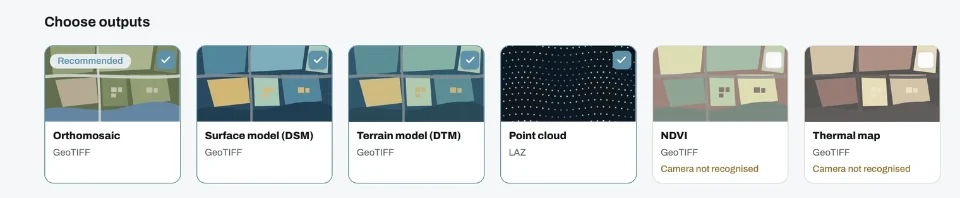
In MapperTool, select the relevant outputs and inspect the reconstructed area. Compare the features that matter to the job, including difficult boundaries and missing surfaces. This is an acceptance test for your work, not a claim that one engine is universally more accurate.
Keep the computer specification and settings with your notes if you compare processing times. A single job does not establish a universal speed or accuracy ranking. For an existing workflow, also list the steps that already work well. A change is useful when it improves a real constraint without breaking the delivery that follows.
Does the client get a better handover?
An online workflow should earn its place at the handover. Ask a colleague to open the project and locate a feature, inspect a layer and understand a reported measurement. A MapperTool share link opens in the browser without an account. If the recipient should have the project on their own dashboard, invite them by email instead.
If another application needs the data, test an export there too. Confirm the coordinate system, units and the actual file contents. Our point cloud format guide helps distinguish a browser review from a technical file delivery.
Ask the recipient to repeat the check without your help. If they can find the area, switch a layer and read a measurement on their own, the handover has passed. If they need a call, note what they asked, because that question will come back on every job.
Which requirements should stay on the list?
List any local processing controls, editing tools or downstream operations that are essential to your work. Verify them individually rather than assuming that sharing a list of output names makes two products equivalent.
MapperTool processes photographs, not LiDAR data, and it does not try to reproduce every desktop control. An online alternative does not need to, but it must complete the operations your delivery depends on.
Also distinguish PIX4Dmapper from PIX4Dcloud. If your starting point is already a hosted PIX4D workflow, the comparison changes. Our cloud software guide covers that broader selection.
What does a switch cost beyond the licence?
The price on a pricing page is only part of the change. A move away from PIX4Dmapper also costs time, and that time is easier to plan when it is written down before the first test.
Learning time for everyone who processes or reviews projects.
Rework of templates, report layouts and naming conventions.
A period of running both workflows while the first deliveries are checked.
Client communication if the delivery format or the review link changes.
Hardware you keep, replace or no longer need for local reconstruction.
None of these is a reason to stay where you are, but each one belongs in the decision. A cloud workflow can remove the workstation line entirely, while a move between two desktop products usually keeps it. Put a rough number of hours against each line, then compare that total with the time the new workflow saves on a typical job.
Frequently asked questions
What is the difference between PIX4Dmatic and PIX4Dmapper?
Both are PIX4D desktop photogrammetry applications. PIX4Dmatic is sold in Analyst, Standard and Pro plans with different processing and analysis scope. Compare the plan details against the outputs and editing steps your project needs.
Is there an online alternative to PIX4Dmapper?
Yes. PIX4D offers PIX4Dcloud as its own hosted service, and MapperTool processes drone photographs in the cloud with review and sharing in the browser. Test either one with a finished job before you switch.
Can I import a PIX4Dmapper project into MapperTool?
No. Start from the original photographs. Keep the old project and its exports until the new delivery has been checked.
How much does PIX4Dmapper cost?
PIX4D listed PIX4Dmapper at about USD 3,990 per year billed yearly when we checked on November 9, 2026. Check the PIX4D pricing page for the current price.
MapperTool is a strong candidate when the priority is processing survey photographs, working with the results online and giving clients a convenient view. Use the representative job to prove those benefits in your own workflow, then choose capacity and features from the current plans.