
You can evaluate several PIX4D products through a free trial, but that is different from having an ongoing free processing plan. Whether a trial fits a client project depends on the specific product, its terms, the available features and the time needed to finish the delivery.
According to PIX4D's trial documentation, checked November 2, 2026, most products offer a 15 day trial. The documentation describes payment details and automatic subscription conversion for PIX4Dmatic and PIX4Dcloud. It lists export access for several named product trials, while PIX4Dmapper trial access must be requested through sales. Check the exact terms for your product rather than relying on an older general description of a PIX4D trial.
Treat the trial as a delivery test
Have a suitable dataset ready before starting the evaluation period. Define the required outputs and the application that will receive them. Leave time to inspect the reconstruction, resolve problems and test the export.
A trial that ends immediately after processing may tell you little about the rest of the workflow. Can the recipient open the file? Can you explain a measurement? What remains accessible after the trial ends? These questions matter before promising a delivery date.
Read the licence terms for your intended use. Feature access and permission to use a product in a particular commercial context are separate questions. Keep a record of the applicable terms and deadlines instead of treating the word free as a complete answer.
An ongoing Free plan is another way to evaluate mapping
MapperTool offers a Free plan rather than only a short evaluation period. It lets you process suitable projects and inspect the outputs online without entering payment details. Capacity, retention, processing settings and download access still depend on the plan, so check the current details against the job.
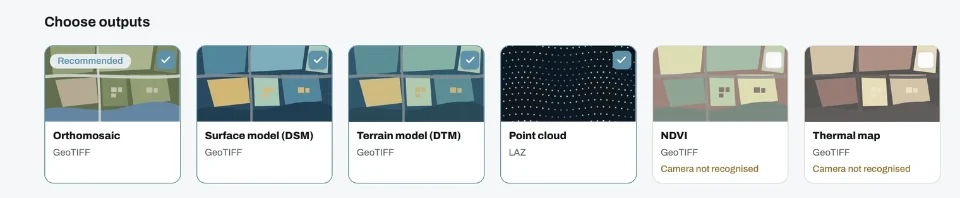
This is useful when you want to learn the workflow before committing to paid features. You can see whether the photographs reconstruct well, inspect a map and try browser measurements. Upgrade when the actual delivery requires the capacity or access of a paid plan.
Decide from the completed workflow
For any free option, make a short list of the result you must retain, the export you must send and the access the client needs. Test those steps before relying on the software for a deadline.
MapperTool is worth considering when you want cloud processing and a convenient browser review without installing desktop reconstruction software. Its Free plan provides a practical entry point, while paid plans support larger or more specialised work.
Our free drone mapping software guide explains the broader costs around setup, review and delivery. A free trial or plan can help you evaluate the tool. The final decision should come from whether it completes your particular job.