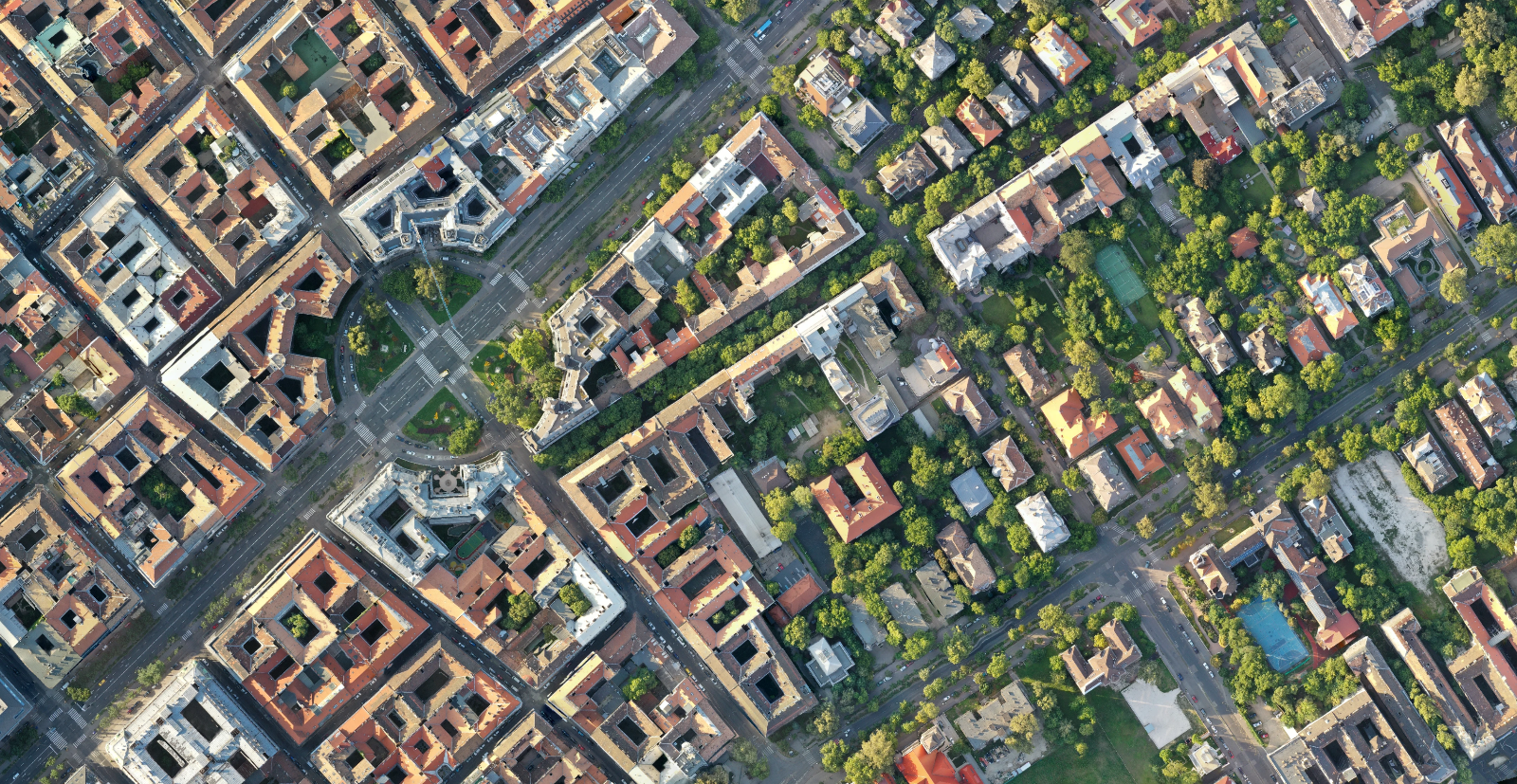
A client asks for an aerial photo of the site, you send one, and the next question is how wide the yard is. The photo cannot answer that. The camera was directly above only one point in the frame, everything else is seen at an angle, and objects near the edges lean outwards. Measure the same wall in two corners of that image and you get two different numbers.
An orthomosaic solves exactly this problem, and it is the output most drone mapping projects are really built around. It is also the one most often mistaken for a large aerial photo or a stitched panorama, which are different things made in a different way for a different purpose.
Key takeaways
An orthomosaic is a single image in which every pixel is shown from straight above and sits at a known ground position.
It is built from overlapping photos plus the 3D geometry the software reconstructs from them, not from pixel matching alone.
You can measure distance and area on it directly. You cannot read a height from it.
Its level of detail is decided by the flight, not by the export setting.
What an orthomosaic is, in one sentence
An orthomosaic is a georeferenced image assembled from many overlapping aerial photos and corrected so that every pixel appears as if the camera had been directly above it.
Two words carry the whole meaning. Ortho refers to the orthographic projection, where lines of sight are parallel rather than fanning out from a single camera position, so leaning buildings are straightened and terrain displacement is removed. Mosaic refers to the assembly: no single photo covers the site, so hundreds of corrected image patches are blended into one continuous raster.
The practical consequence of both words together is that scale is constant across the whole image. Ten pixels mean the same ground distance in the middle of the map and in the far corner. That is what makes it a map rather than a picture, and it is why an area traced on an orthomosaic can go into a quote.
Why a stitched panorama is not the same thing
Panorama and photo stitching software aligns images by matching pixel patterns along their overlapping edges, then warps and blends them until the seams disappear. The result looks continuous, and on a flat subject at a long distance it can look convincing.
What it lacks is geometry. There is no terrain model underneath, no reconstructed camera positions in a real coordinate system, and therefore no way to remove the perspective effect that varies from photo to photo. Scale drifts across the image, buildings still lean, and the file carries no information about where on Earth it sits. It opens in an image viewer, not in a GIS.
The short version: a panorama is a picture of a place, an orthomosaic is a measurement surface for that place.
How overlapping photos become one image
The pipeline is the same in every photogrammetry package, and knowing the four steps explains most of what can go wrong.
First, the software finds the same physical features in many photos and solves for where each camera was and how it was oriented when the shutter fired. Second, it reconstructs a dense set of 3D points from those matched features. Third, it builds an elevation surface from those points and uses it to reproject every pixel of every photo to the position it would occupy if seen from directly above. That third step is the orthorectification, and it is where the ortho gets its name.
Fourth, the corrected patches are blended, colour balanced and written out as a single georeferenced raster.
Because step three leans on an elevation surface, the quality of that surface shows up in the image. Where the surface is good, vertical structures sit cleanly on their footprint. Where it is weak, tall or thin objects can appear stretched or bent.
What the resolution number tells you
Ground sample distance is the ground size of a single pixel. A 2 cm/px orthomosaic means each pixel covers 2 cm on the ground, and it is fixed at the moment you choose a flight height and a camera. Exporting the same dataset at a finer setting produces a larger file containing no additional information.
What you want to know | Read it from | Note |
|---|---|---|
How wide is the yard | Orthomosaic | Direct measurement, scale is constant across the image |
How large is the roof surface | Orthomosaic | Trace the outline and read the area |
How tall is the building | DSM, not the orthomosaic | The orthomosaic carries colour only, no height |
Where exactly does that manhole sit | Orthomosaic plus a coordinate readout | Depends on absolute accuracy, not on GSD |
How much material is in the pile | DSM and DTM together | See the volume workflow |
Where an orthomosaic goes wrong
Four failure patterns cover almost everything you will meet in practice.
Moving objects are the most visible. A lorry that drove across the site during the flight appears in some photos and not others, so it can end up ghosted, halved or smeared across a seam. Water behaves similarly for a different reason: a surface that changes between exposures gives the matching step nothing stable to lock onto.
Thin vertical structures are the second pattern. Poles, masts and chimney stacks sit far above the surface used for correction, so they tend to lean, break or partially disappear.
Repetitive or featureless surfaces are the third. Fresh snow, a uniform gravel yard or a large flat roof leave the software with too few distinct features to match confidently, which shows up as a soft or distorted patch.
What you can and cannot do with one
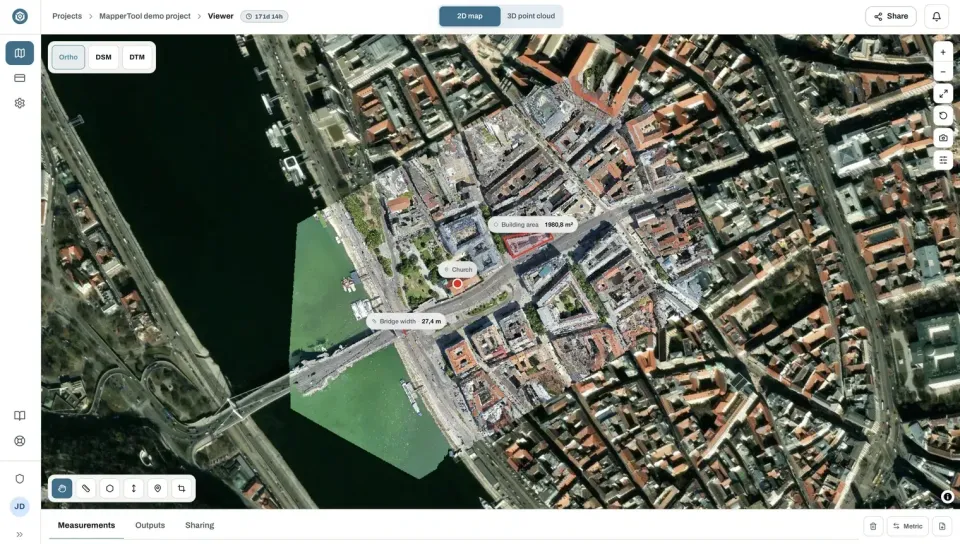
You can measure distances, trace areas and count objects. You can compare two dates of the same site by switching between projects, drop the file into a GIS or CAD drawing, and print it at a size that survives a site meeting. You can also hand it to a client who has no technical software at all, because it is fundamentally an image.
You cannot read elevation from it, calculate a volume from it alone, see under a canopy, or expect a facade to be visible, since a top down projection flattens vertical faces away. When the vertical face is the point, the point cloud is the file to reach for, compared in point cloud or 3D mesh.
Formats and coordinate systems
GeoTIFF is the default for delivery. It stores the georeferencing inside the file, so nothing has to travel alongside it, and it opens in every GIS and CAD package a surveyor is likely to use. A JPG or PNG export is worth adding only when someone needs a light version for a slide or an email.
The decision that actually matters is the coordinate reference system. A map in a UTM zone will not sit on top of a client's drawings if those are in a national grid. The person best placed to reproject it is you, not the person opening the attachment. Ask which EPSG code their drawings use before processing. If nobody can tell you, a UTM zone is a safe default and easy to convert later. Orthomosaic files are large, and the photo count that produced them is usually the driver.
Frequently asked questions
Is an orthomosaic the same as a georeferenced map?
Nearly. Georeferenced means the file knows where it sits on Earth, which an orthomosaic always is. Orthorectified means the perspective distortion has also been removed so that scale is constant. A scanned paper map can be georeferenced without being orthorectified, so the two terms are related but not interchangeable.
Can I build an orthomosaic if my photos have no GPS tags?
The reconstruction itself can work without them, because the geometry comes from the images. What you lose is the georeferencing: the result will have a consistent internal scale but no known position on Earth until you give it reference coordinates. In practice, keep the GPS tags in the images and let the processing use them.
Why is one corner of my orthomosaic blurred or distorted?
Almost always too little overlap in that area, or too few usable features on the surface there. Check whether the flight lines ended early, whether the site edge was reached before the last pass, and whether that part of the site is water, fresh tarmac, snow or another texture the matching step struggles with.
Does a finer GSD always mean a better map?
No. A lower flight gives you smaller pixels but also many more photos, longer processing, larger files and more battery changes. Pick the coarsest GSD that still resolves the smallest thing you need to see, and spend the saved effort on overlap and flight discipline instead.
Before your next flight, decide what the smallest object you need to identify on the finished map is, and let that choose the flight height. Everything else follows from that one decision: the file size, the processing time, the number of batteries and the sharpness the client notices. It is also the only part of the process you cannot fix afterwards.