A farm survey can show where trees or bales are spread across a site. With automatic object detection, it can also provide a starting count. That is a useful addition to agriculture maps when the question is practical: how many visible trees are in this orchard block, or how many separate bales were left in a field when it was surveyed?
MapperTool Auto Count supports both tasks. It uses the project's RGB orthophoto and DSM to find the selected type of object, shows the detections on the map and returns a count. The module is available with Plus and Pro subscriptions.
The most useful results come from matching the counting task to what the drone actually recorded. An orchard with distinct crowns and a field with scattered bales give you objects that can be checked individually.
Counting orchard trees on agriculture maps
Consider an orchard manager who needs to check the number of visible trees in one block. Rows make the layout easy to follow, but manually counting every crown can become repetitive. It is also easy to lose your place after zooming or moving across a large map.
In Auto Count, select the tree option and run the analysis. The map then provides a set of detected positions to inspect. Follow several rows and look for three things: an unmarked tree, two markers on the same crown, or a marker where there is no tree.
You can add missed trees, remove unwanted detections and move misplaced points. This lets you review the orchard while keeping the count and the marked locations together.
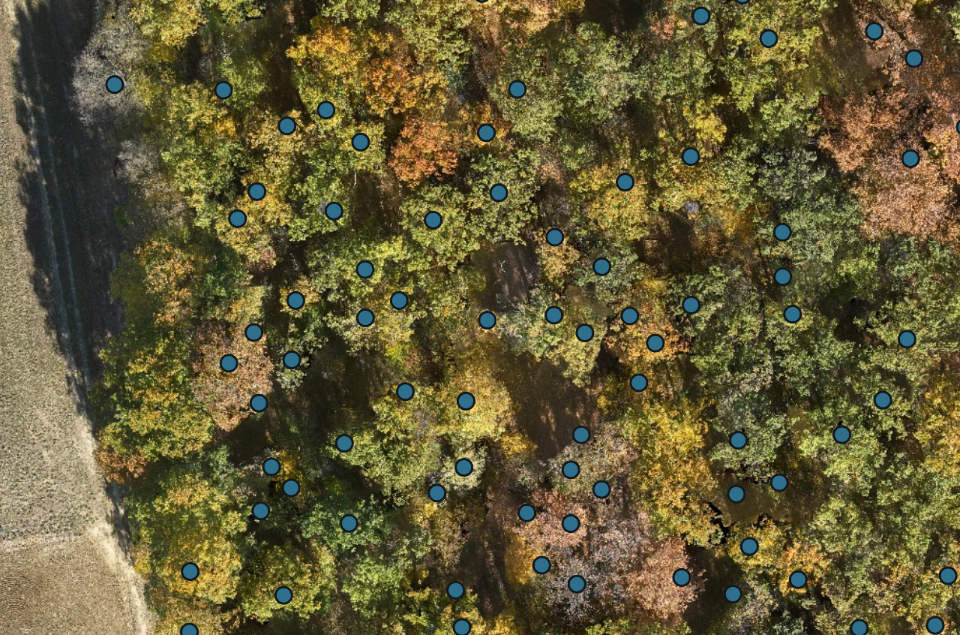
A planting plan and a drone count answer different questions. The plan may specify the number of planting positions, the survey shows the trees that can be detected in the imagery. An empty space in a row should remain empty in the result. A small replacement tree can also be harder to recognise than the mature crowns beside it.
Where crowns overlap, review becomes more important. Two neighbouring trees may look like one continuous crown from above. Leafless trees can be difficult for recognition as well. A count of visible crowns should not be presented as a guaranteed inventory of every stem beneath a closed canopy.
Counting bales across a field
Bales are another useful target because their locations can be widely scattered. Select the bale option to search for them without mixing in nearby trees or buildings.
After the run, scan the field for unmarked bales and check the detections around field edges or other objects. The total updates when you add or delete a detection, so you can finish with a count that matches the locations you have reviewed.
The key distinction is between separate visible bales and stacked material. A drone may see the upper bales in a stack while lower ones remain hidden. Auto Count does not infer those concealed layers. For that situation, use another record or a ground check to establish the full inventory.
Timing matters too. If bales were collected after the flight, the map still describes the earlier survey. Record the survey date with the count so that the person using it knows which field condition it represents.
Set the area before comparing numbers
A whole farm and an individual block are different counting areas. Before starting, decide which area the number should describe. Auto Count respects the project's saved crop, allowing the analysis to focus on that part of the survey.
Check the boundary carefully. If a tree or bale is partly outside the chosen area, decide how you intend to treat it during review. For repeat surveys, use a consistent area and counting rule; otherwise, a change in the total may simply reflect a different boundary.
What should you check before using the total?
A short review can focus on the places most likely to change the count:
Dense groups: look for objects merged into one detection.
Small objects: inspect young trees or distant-looking bales that occupy few pixels.
Shadows and blurred patches: check whether the image supports a clear identification.
The boundary: confirm that the counted area matches the job.
Recent site changes: make sure the survey date is suitable for the decision.
It also helps to inspect some clear, ordinary parts of the map, rather than only the difficult ones. That gives you a better sense of whether the detections are consistent across the area.
A drone orthomosaic provides the visual record for this review. Auto Count adds the locations and total, and its editing tools let you correct the results without rebuilding the list elsewhere. For farm teams already processing surveys in MapperTool, it is a practical way to get more use from the same project.