A thermal drone survey can help locate possible insulation problems across a roof or an inaccessible part of a building. It measures the thermal behaviour of the visible surface, so it shows where to investigate rather than revealing the insulation directly.
Thermal roof maps are especially useful on large buildings, where a collection of close-up images can be difficult to place. A mapped finding has a location relative to rooflights, parapets and other features that a contractor can recognise.
MapperTool turns radiometric imagery into a thermal orthomosaic that you can examine alongside an RGB map. The useful question is then specific: does this area behave differently from a comparable area, and what could explain that difference?
What can thermal roof maps actually tell you?
For a heated building in cold weather, heat escaping through a weak part of the envelope can make the outside surface warmer than comparable surrounding areas. An interior inspection may show the same weakness as a colder area. The direction of the temperature difference depends on which side you observe and the conditions at the time.
That makes thermography useful for locating suspect areas, but it does not directly give you insulation thickness, U-value or annual energy loss. Those conclusions need additional information about the construction, temperatures and heat flow.
A surface temperature map also cannot see through an outer cladding layer or tell you everything happening in a ventilated cavity. Before commissioning a survey, check which surface the camera will actually observe and how it relates to the insulation you want to assess.
For the broader principles of radiometric capture and interpretation, see our guide to thermal drone surveys.
When should you fly for insulation inspection?
Choose conditions that make heat transfer through the building visible without letting recent weather dominate the image. For a heated building, that usually means a sustained indoor-to-outdoor temperature difference, limited wind, dry surfaces and little influence from recent sunshine.
Before dawn can be useful because the building has had time to cool after daytime solar heating. The right timing depends on its materials and recent weather, however. A roof that stores substantial heat may behave differently from a lightweight facade.
Discuss the inspection with the building operator before choosing the time. Ask which areas are heated, whether heating has been running consistently, and whether roof-level equipment could affect the surfaces nearby. An unheated section beside a heated workshop may show a temperature difference even when both are built correctly.
There is no useful universal rule that every building can be surveyed at the same time or with the same temperature threshold. Match the inspection method to the construction and the question being investigated.
Three patterns that need different follow-up work
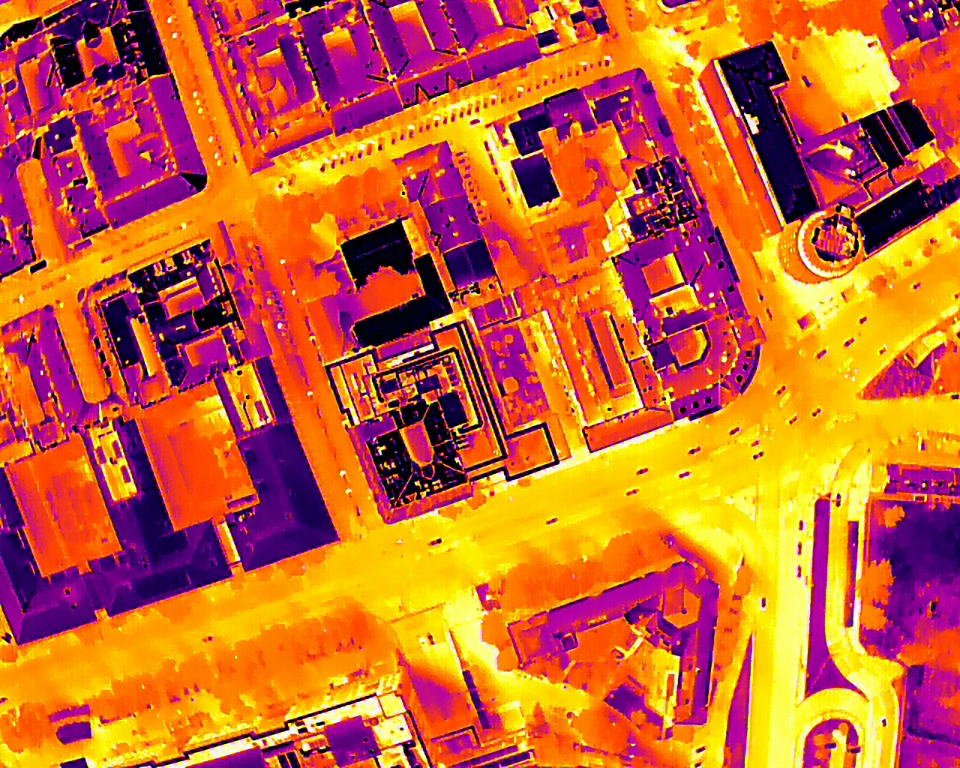
A local patch that may indicate an insulation defect
Suppose part of an otherwise uniform roof appears warmer from outside during a suitable winter inspection. That area deserves attention, particularly if the boundary corresponds to a construction detail or previous repair.
First compare it with the RGB image. A different roof covering, a repair patch or nearby equipment may help explain the pattern. If the surface appears comparable, check the building information and consider an interior inspection or a targeted construction check.
The report can identify the location as a suspected insulation discontinuity without claiming the camera has measured a missing layer. That wording tells the contractor both where to look and what still needs confirmation.
Repeating lines that may be thermal bridges
A regular pattern following framing or junctions may indicate heat flowing through parts of the construction more readily than through the insulation. It can be a design characteristic, a construction problem or a mixture of the two.
Compare similar details across the building. One junction behaving differently from several equivalent junctions can be more informative than the mere presence of a repeating pattern. Drawings and knowledge of the build-up help determine whether the observed behaviour is expected. FLIR's building inspection guidance covers thermography in building diagnostics.
Irregular patterns near joints or openings
Air leakage is another possible explanation for temperature differences around openings and junctions. Aerial imagery may help locate an area of concern, but pressure conditions and viewing position affect what can be seen.
Where airtightness is the question, an interior thermographic inspection combined with a blower-door test can be more informative than an exterior drone survey alone. The US Department of Energy's home energy assessment guide explains how thermographic scanning and air-leakage testing can be used together.
Could the warm patch be moisture instead?
Yes. Moisture can alter how roof materials heat up and cool down, which is why thermography is also used to investigate roof moisture. A warm area after sunset does not automatically mean heat is escaping from the interior.
An insulation heat-loss survey and a roof-moisture survey can therefore require different capture conditions. A moisture investigation may deliberately use the roof's response to daytime heating, while an envelope heat-loss inspection tries to limit that influence. FLIR describes the use of aerial thermography for roofs in its airborne moisture inspection article.
Use the thermal pattern to select areas for an appropriate follow-up test. A moisture meter or targeted roof investigation may be needed to distinguish moisture from other causes. Do not turn every warm region into a proposed insulation replacement area.
Review the survey in MapperTool
Prepare radiometric thermal images that retain temperature information. A colourised thermal screenshot is insufficient for temperature-based analysis. MapperTool can process thermal and RGB photographs together into their respective map layers, thermal output requires a Pro subscription.
In the thermal viewer, use heat points to read and label temperatures at selected locations. Adjust the palette and temperature range to make relevant differences easier to see. These functions are described in the MapperTool thermal map guide.
For a suspected roof defect, compare the affected area with a nearby reference of the same material and similar exposure. Keep the display range consistent when producing images for comparison. A dramatic colour difference created by changing the scale is not evidence that the underlying temperature difference increased.
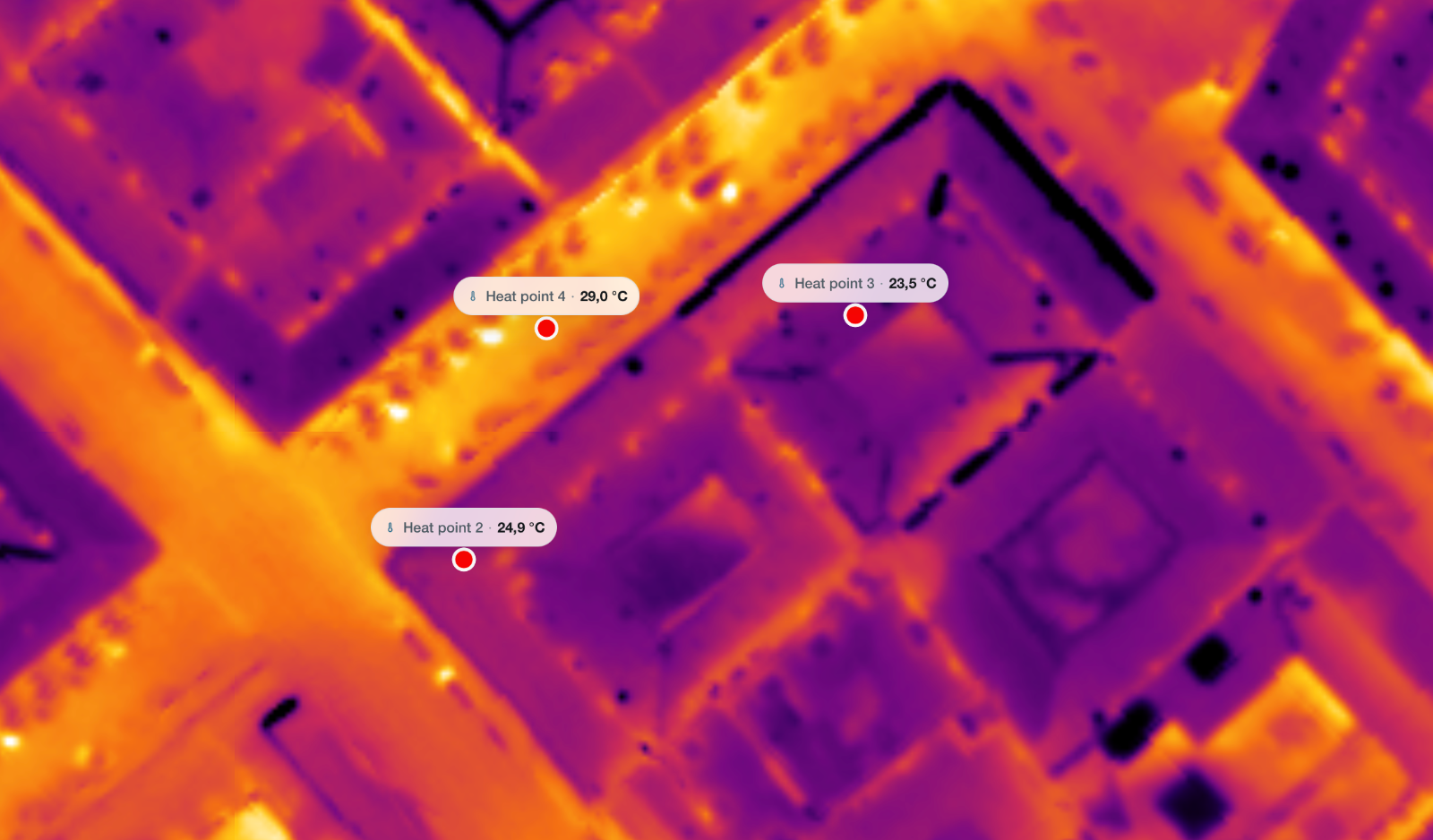
The mapped overview helps the reviewer locate each observation on the building. The RGB layer adds context, while the radiometric GeoTIFF download supports further work in compatible software. Retain the source images too, especially where a stitched map makes an edge or small feature difficult to interpret.
What should the building owner receive?
Provide findings that lead to sensible next steps. For each area, explain where it is, what pattern was observed, the plausible explanation and what further check would help confirm it. Include the survey conditions and any limitations, such as an inaccessible facade or an unheated section.
A useful description might read: “Localised warm area beside the north rooflight, compared with adjacent roof covering. Inspect the junction and insulation continuity from inside.” It gives the owner a location and a task without turning an image interpretation into a confirmed diagnosis.
If the owner needs to explore the mapped findings, you can share the MapperTool project as described in the project-sharing guide. For repair planning, keep the survey observations distinct from confirmed repair quantities until the necessary checks have been completed.
To prepare the mapped part of your inspection, start a project in MapperTool with suitable RGB and radiometric thermal imagery. Use the resulting roof maps to locate, compare and communicate the areas that deserve closer examination.