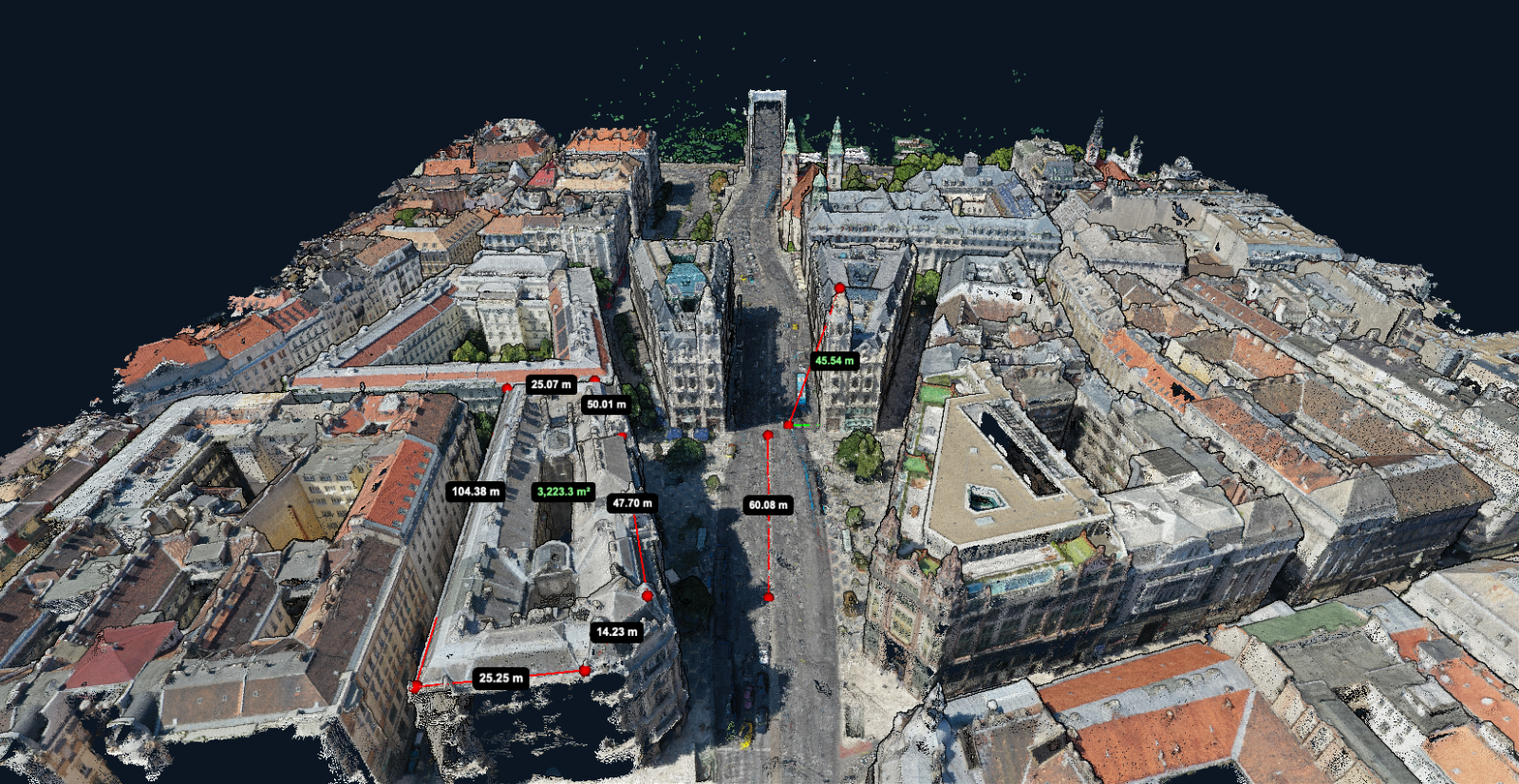
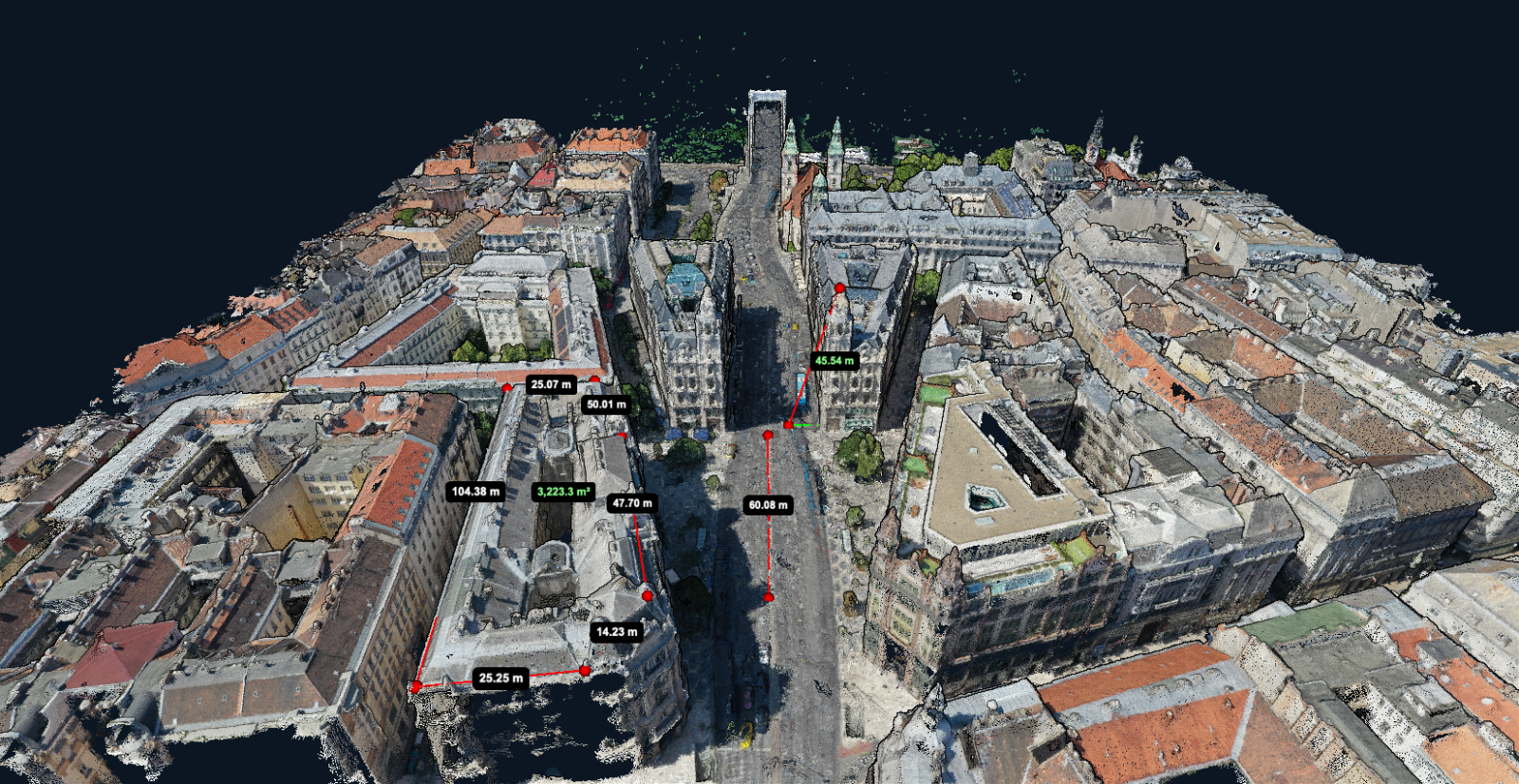
You can measure distance and area on a processed drone map in your browser. Choose the orthomosaic for plan measurements, and use the elevation model or point cloud when the question involves height. In MapperTool, open a completed project and choose the measurement tool for the output you are viewing.
Before using a measurement in a quote or report, check the image date, map position and survey quality. Processing your own photos does not prove that the map is accurate.
Key takeaways
Choose the map layer that fits the measurement before drawing.
Distance and area come from the orthomosaic. Height, elevation difference and volume come from the elevation models.
A polygon on an orthomosaic measures plan area. A sloped surface has a larger surface area.
Extra decimal places do not mean extra accuracy. Round the result to match the survey quality.
Pick the layer before you draw anything
Use the orthomosaic for horizontal distance and plan area. Use elevation data for height and volume. The table shows which layer fits each question.
Question | Layer to measure on | What you get |
|---|---|---|
How long is this fence line | Orthomosaic | Horizontal distance between two points |
How large is this hardstanding | Orthomosaic | Plan area of the traced polygon |
How high is this wall | DSM or point cloud | Elevation difference between two positions |
How much material is in this pile | DSM with a base surface | Volume in cubic metres |
How steep is this slope | DSM or point cloud | Elevation change across a known distance |
How to measure distance and area in MapperTool
Open a completed project that you own or have permission to measure, and choose the orthomosaic in the 2D viewer.
Select Distance or Area in the measurement tools. A Viewer share link does not grant these tools. An Editor share link can, within the owner's plan.
Zoom in before placing points. Use clear features, and decide whether you are following the inside or outside of each boundary.
Complete the shape and read the result with its displayed unit. On the orthomosaic, report horizontal distance or plan area, not terrain-following length or roof surface area.
Compare the result with a dimension measured on site. One matching measurement is a useful check, but it does not prove the whole map is accurate.
Use the output-selection guide to choose a layer. The survey accuracy guide explains how to check the results.
Horizontal distance and ground distance
A line on an orthomosaic measures horizontal distance, as shown on a plan. It does not follow changes in ground height.
On a slope, the distance along the ground is longer than the horizontal distance. If you are estimating fencing, cable or kerbing, tell the client which distance you used.
Zoom in before placing each end point. Use a clear corner, mark or other feature. Avoid blurred edges where it is hard to place the point consistently.
Plan area and sloped surface area
A polygon on the orthomosaic measures the area seen from above. This is called plan area. It is useful for measuring a yard, field or car park.
A pitched roof has a larger surface area than its footprint on the map. The same applies to ramps and embankments. Do not use plan area alone to estimate materials for a sloped surface.
Add enough points to follow curved boundaries. Choose the inside or outside edge of walls and kerbs, and use the same approach for every measurement.
Height and elevation difference
An orthomosaic shows colour, not height. Use the elevation model or point cloud to measure the height difference between two positions.
A point cloud can help you inspect features that are hard to see from above. Rotate it to check walls, edges and structures. You can only measure a feature if it was captured clearly in the source images and reconstructed in the result.
Check height measurements carefully. Vertical errors can be larger than horizontal errors. Compare several nearby measurements and use independent checks when the result matters.
Measure on your own survey
Upload your photos, get the orthomosaic and the elevation models from the same flight, and take the measurements in the browser. The free plan takes up to 150 photos per project.
Start a projectMeasuring stockpile volume
A volume measurement compares the DSM over a pile with an estimated surface beneath it. It adds up the difference inside the boundary you draw.
The viewer estimates the base by fitting a flat plane to elevation cells around the polygon boundary. Place the boundary on undisturbed ground around the pile. A boundary partway up the pile changes the estimated base and the volume.
How precise are the measurements?
A tool may show many decimal places even when the survey cannot support that precision. Do not copy every decimal into your report.
Round results to match the accuracy checks for the survey. Record the map resolution and how accuracy was checked. A resolution of 2 cm/px does not mean the map is accurate to 2 cm.
Measuring on a map you have shared
On a public share link, a Viewer can explore the results. An Editor can also measure and download supported outputs within the owner's plan. Guest measurements stay in that guest session and are not saved into the owner's project. Invited collaborators are different: an invited Editor can save measurements on the project. The client-sharing guide explains which access method to choose.
A guest cannot send saved annotations back through a public share link. Ask for a screenshot and description, or invite them as an Editor if they need to save measurements in the project.
Frequently asked questions
Why does my area measurement differ from the client's figure?
Check whether both measurements use plan area or sloped surface area. Then compare the boundaries, units and coordinate systems. Agree which edge to follow before measuring again.
Can I measure on the map without processing anything myself?
You can measure on a processed project when your access includes measurement permission, such as an invited Editor or an Editor share link. Viewer access alone does not allow drawing measurements. Check the imagery date, resolution and positional quality before using any map as measurement evidence.
Is the viewer a replacement for a GIS?
No. The viewer lets you inspect layers and take measurements. Downloads depend on your permissions and plan. Use GIS software for editing datasets, managing attributes, spatial analysis or format conversion.
How do I measure a change between two dates?
Measure the feature on each survey separately. Use the same boundary and units, then compare the results. Check that the surveys have compatible positioning and accuracy before treating the difference as a real change.
Choose the layer before measuring. Record the boundary, units and accuracy checks with the result so the client knows what the number means.